
FleetDispatch
Every fleet reading, at a glance.
A dispatch management app designed for small and midsize fleets and public agencies in Taiwan. Dispatches, returns, reminders, and reports start on one phone, iPhone or Android; schedule on a tablet, close out on Mac, and carry it with you on Apple Watch. The Today Dashboard can be customized to fit your work.
- Platforms
- iPhone, iPad, Mac, Apple Watch, Android
- Price
- Free, with no ads in the app
- Sync
- Your iCloud (Apple devices) and TLS-encrypted local network
- Languages
- 10
Core features
Everything the paper dispatch log did, now digital: from dispatch to monthly report, one app does it all.
Dispatch and return
The vehicle, driver, and last odometer reading are filled in for you. On return, the trip distance is calculated automatically, and a hint appears next to the field if the end odometer is less than the start odometer.
Custom dashboard
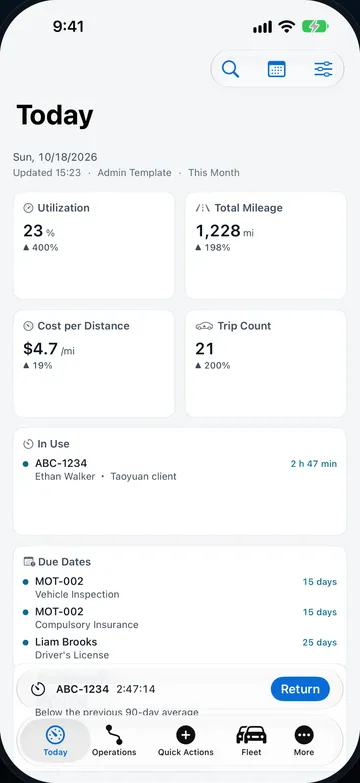
28 metrics and 5 templates. Add, remove, and reorder cards, and set the period, vehicles, and comparison period. Cards are arranged in 1, 2, 4, or 6 columns based on the available width.
Vehicle Status Center
See each vehicle’s overview, due dates, maintenance, recent trips, work orders, and inspections on one page, then dispatch it or export a vehicle report right from there.
Reminder Center
Due dates, maintenance, overdue returns, pending approvals, and fuel efficiency anomalies in one list. Snooze them or go handle them directly.
Reports and export
Preview before you export. PDFs use an A4 layout with headers repeated on every page; CSVs are exported as UTF-8 (with BOM) and protected against formula injection.
Multi-user sync
An iPad, Mac, or Android tablet in the office acts as the host and syncs over the local network with TLS encryption. Paired devices reconnect with a signed device key.
More features
- Work orders, inspections, and parts inventory
- Work orders, driver vehicle inspections (DVIR), and parts and inventory management. Completing a work order automatically deducts stock and creates a maintenance record.
- Global search and Dispatch Timeline
- Search vehicles, drivers, locations, trips, work orders, and parts all at once. On iPad and Mac, the Dispatch Timeline plots vehicles against time and marks schedule conflicts.
- Analytics
- Mileage, fuel efficiency, and cost trends, driver rankings, and EV battery-swap stats.
- Notifications and sounds
- The Fleet Pulse alert sound. Set receiving and sound separately for 5 notification types: Trip Requests & Approvals, Due Dates, Maintenance, Usage & Energy, and Monthly Report.
- Onboarding and Sample Mode
- Guided setup the first time you use the app. Sample Mode uses temporary data kept completely separate from your real data, and it’s fully cleared when you finish.
- OBD-II vehicle diagnostics (Beta)
- Works with a Bluetooth ELM327 adapter for automatic VIN detection, real vehicle speed, and reading trouble codes (turn it on in Settings).
Screenshots
Actual app screens on iPhone, iPad, Mac, Apple Watch, and Android.
Your whole fleet, at a glance 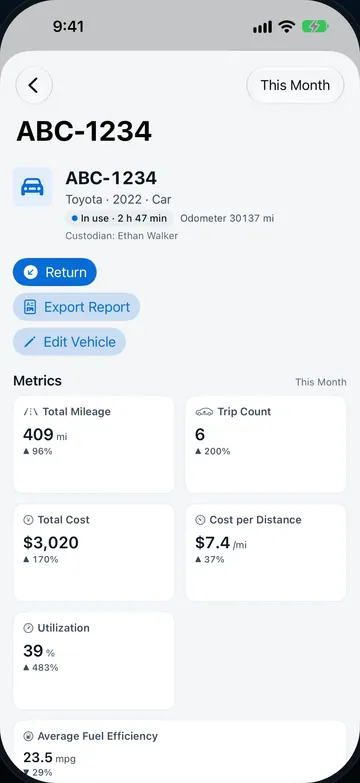
Every vehicle on one page 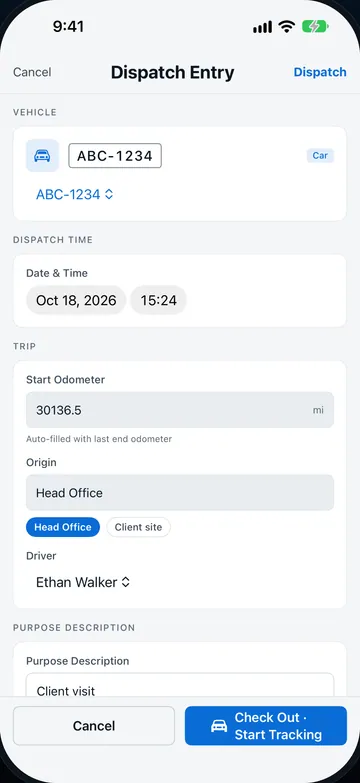
Dispatch and return in seconds 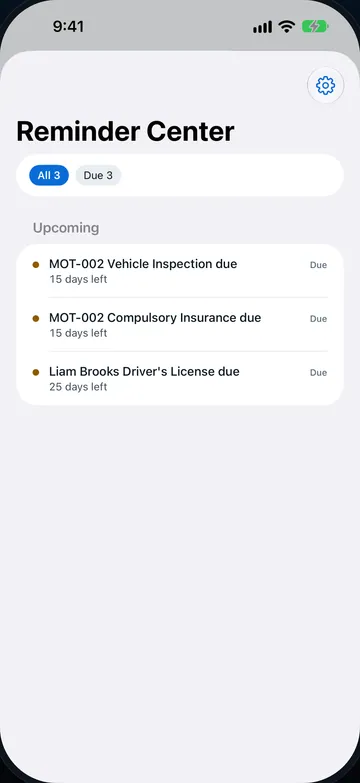
Never miss a service or renewal 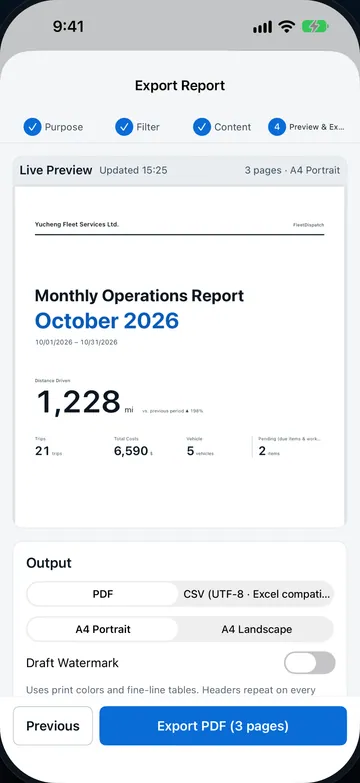
PDF reports with live preview
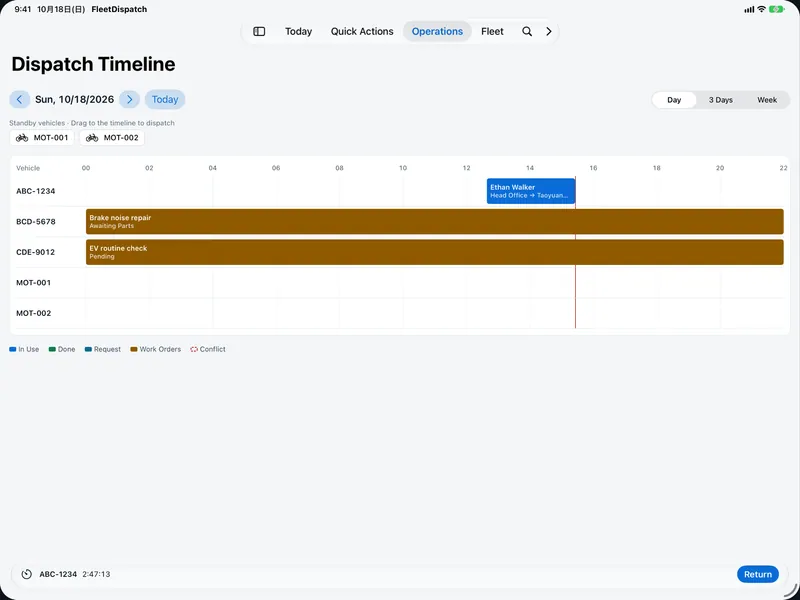
See every trip on the timeline 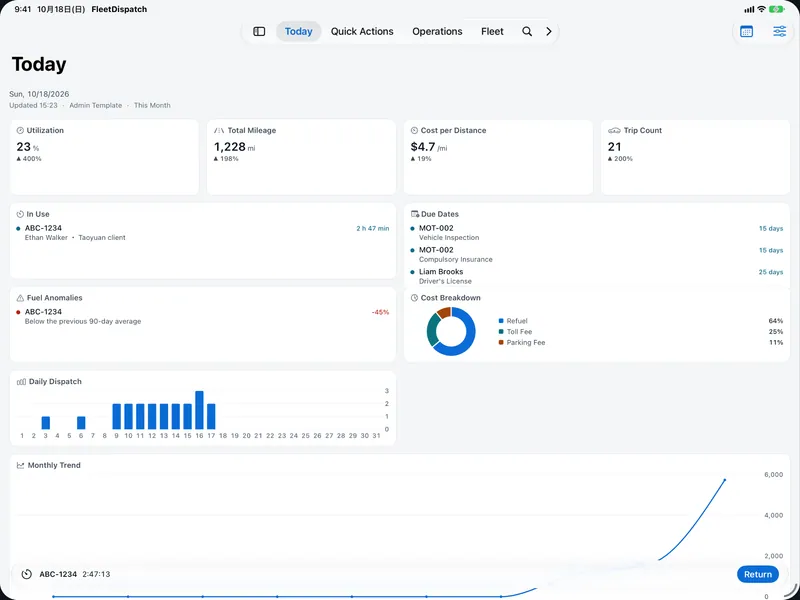
Your whole fleet, at a glance
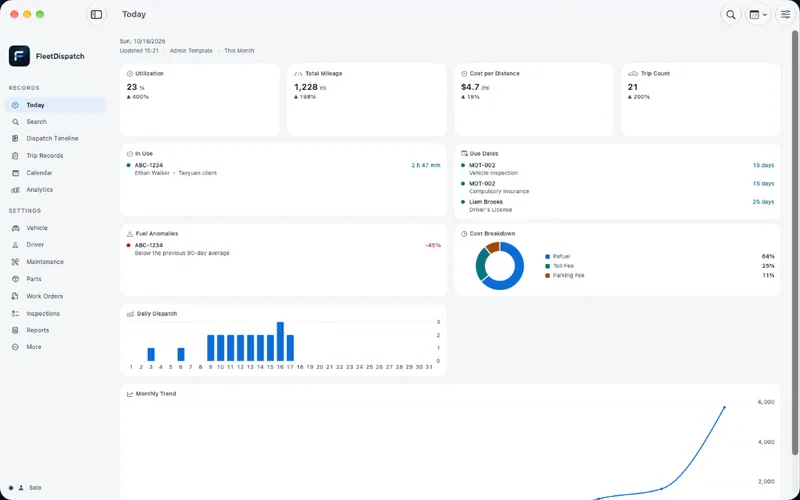
A fleet console for your Mac 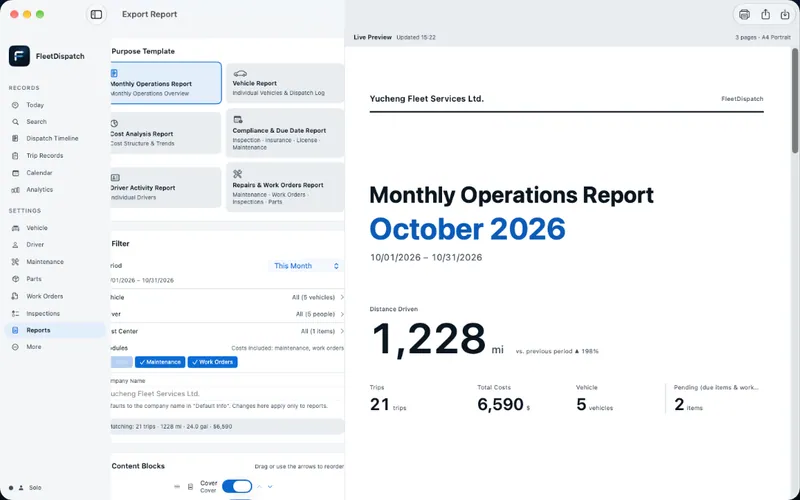
Build a report, preview it live
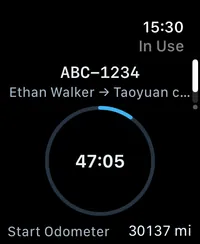
A timer for the trip in progress 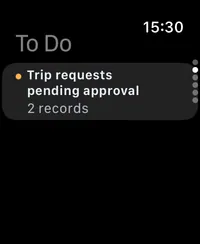
To Do: items that need your attention 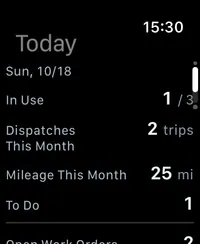
Today: today’s trips and key readings
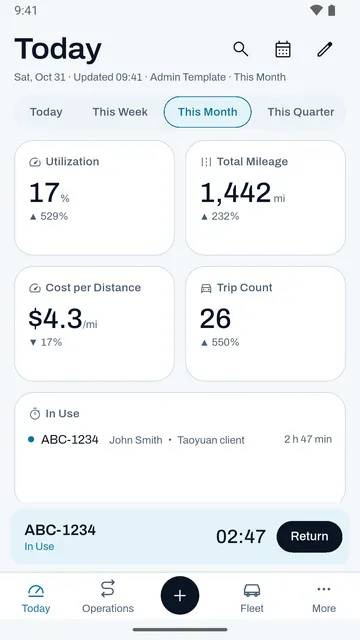
Your whole fleet, at a glance 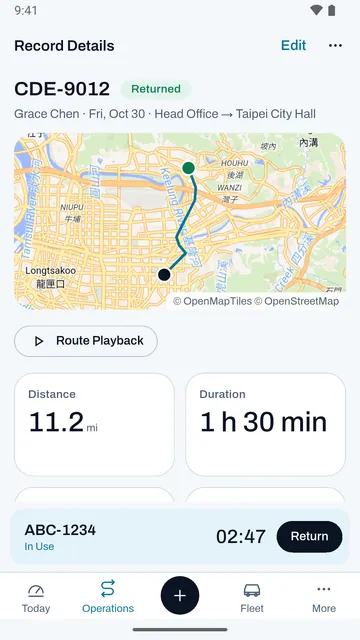
Route map and playback 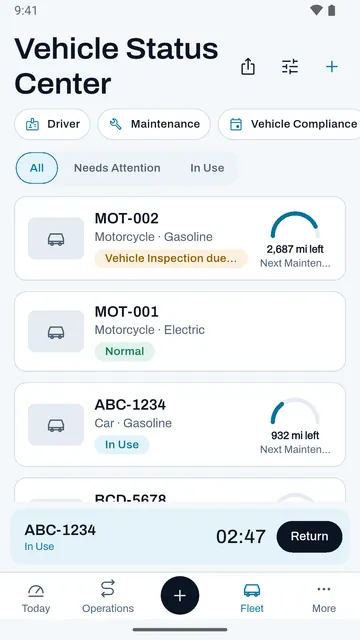
Every vehicle on one page 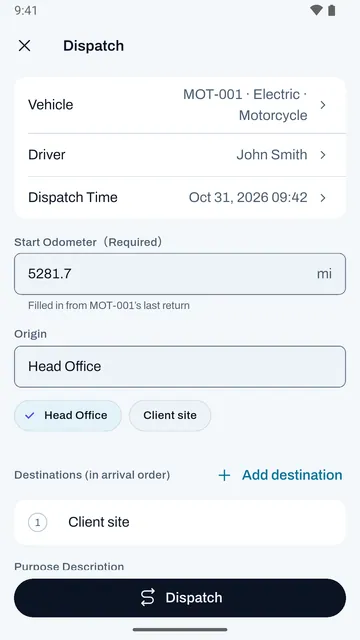
Dispatch and return in seconds 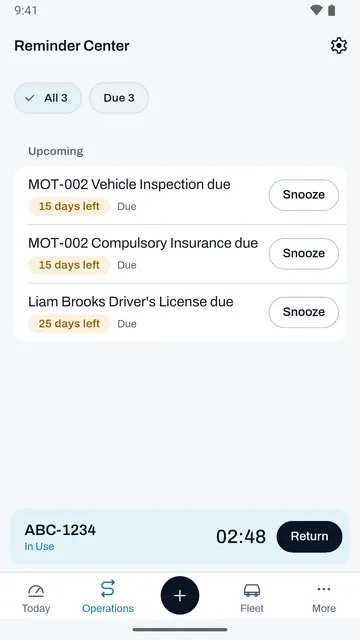
Never miss a service or renewal
The iPhone, iPad, Mac, and Apple Watch screenshots are from the previous version on the App Store and will be updated soon; the Android screenshots are from Google Play. All show sample data.
Design principles and privacy
Manage your fleet like reading a gauge, while your fleet data stays in your hands.
- Readings first
- Mileage, times, and days until due always use monospaced figures, and status is shown only with a fixed set of signal colors, so what matters stands out at a glance.
- Done in two steps
- To dispatch, just pick a vehicle and confirm; the start odometer is filled in from that vehicle’s last end odometer. On return, the trip distance is calculated automatically.
- Your data stays with you
- Fleet data is stored on your devices (Apple devices can sync through your own iCloud) and never passes through our servers. The app has no ads and no third-party tracking.
Privacy and security
- Never touches our servers
- Data is stored on your devices. Apple devices sync through your own iCloud account, and you can move data to and from Android devices with an encrypted backup file.
- Encrypted local network sync
- For teams, data travels over your company’s local network encrypted with TLS, and both sides compare a security code when pairing.
- Role-based permissions
- Admins, drivers, and viewers each have different permissions, and the host checks every change against the sender’s role.
- Maps and help
- Map tiles come from OpenFreeMap and help articles from instw.org; neither receives your fleet data.
Supported platforms
Log on your phone, dispatch on a tablet, close out on Mac, carry it on Apple Watch: Apple and Android devices share the same core features, with every device doing what it does best.
iPhone
The driver’s main tool: log dispatches, returns, fuel, and tolls. Tabs include Today, Operations, Quick Actions, Fleet, and More.
iPad
Wide screens show a sidebar and the Dispatch Timeline. Drag a standby vehicle onto the timeline to dispatch it. iPad can also act as the local network host.
Mac
The office console: record tables, reports and export, backups, and data import, with menu commands and keyboard shortcuts. Mac can also act as the local network host.
Apple Watch
Today and To Do on your wrist, plus a timer for the trip in progress. Your paired iPhone provides the data and carries out quick dispatches and returns.
Android
Phones and tablets, with the same core features as iPhone and iPad. Home screen widgets, an ongoing trip notification, and app shortcuts; tablets can also act as the local network host.
Widgets
Readings on the Home Screen and Lock Screen, Quick Depart in Control Center, and a Return button in Live Activities and the Dynamic Island.
CarPlay
Apple-approved Driving Task category: see trips in progress, dispatch quickly, check to-dos, and hand frequent places to a maps app for navigation. For safety, there’s no typing in the car.
| Device | Minimum OS | Notes |
|---|---|---|
| iPhone | iOS 26 | Home Screen and Lock Screen widgets, Control Center, Live Activities |
| iPad | iPadOS 26 | Can act as the local network host |
| Mac | macOS 26 | Can act as the local network host |
| Apple Watch | watchOS 26 | Requires a paired iPhone |
| Android | Android 8 | Phones and tablets; tablets can act as the local network host |
Download
Free to download, with no ads in the app. iPhone, iPad, Mac, and Apple Watch share a single app; Android phones and tablets get it from Google Play.
Apple and Android devices work together in the same fleet and can move data with an encrypted backup file.
- Price
- Free
- Ads and tracking
- None
- Languages
- 10
- Developer
- YucDu
Frequently asked questions
Do I need to set up a server?
No. One person needs only one device. For teams, an iPad, Mac, or Android tablet in the office acts as the host, and other devices pair and connect with it on the same local network.
Does it cost anything?
FleetDispatch is a free download on the App Store and Google Play, and there are no ads in the app.
Does my fleet data pass through your servers?
No. Your data is stored only on your devices, in your own iCloud (Apple devices), and on the host device you choose to pair with.
How do I move my data to a new phone?
On Apple devices, sign in with the same Apple Account and turn on iCloud, and your data syncs automatically (keep every device on the latest version). When switching between Apple and Android, move your data with a password-encrypted backup file.
Which formats can I export?
PDF reports (with templates such as monthly operations, single vehicle, cost analysis, and compliance and due dates), detailed CSV, and full backup files encrypted with AES-256-GCM.
Does the app record my location?
Only after you turn on “Record this trip’s route,” and only while that trip is in progress; recording stops automatically when you return the vehicle. You can turn it off in Settings at any time.
Can’t find your answer? Email fleetdispatch@instw.org and include the app version, your device model, and the OS version.
Docs and support
You’ll find how-to guides, troubleshooting, and the changes in each version in Documentation.